Contact Us

If you still have questions or prefer to get help directly from an agent, please submit a request.
We’ll get back to you as soon as possible.

Please fill out the contact form below and we will reply as soon as possible.

  • POS
  • Pay
  • Reservation
  • Order
  • Website
  • English (UK)
    GB English (UK)
    FR French
    DE German
    ES Spanish
    IT Italian
    NL Dutch
    PL Polish
    CS Czech
    SK Slovak
    HU Hungarian
    RO Romanian
    HR Croatian
    PT Portuguese
  • Log in
  • Updates
  • POS
  • Pay
  • Reservation
  • Order
  • Website
  • English (UK)
    GB English (UK)
    FR French
    DE German
    ES Spanish
    IT Italian
    NL Dutch
    PL Polish
    CS Czech
    SK Slovak
    HU Hungarian
    RO Romanian
    HR Croatian
    PT Portuguese
  • Log in
  • Home
  • POS
  • Comprehensive guide
  • Use your POS system
  • payment

Managing - linking payment methods in Omniboost (only for 🇳🇱)

This short instruction provides for linking new payment methods. These payment methods have been created in the DISH Backoffice in the Netherlands and are shown in your Omniboost portal. If you do no…

This short instruction provides for linking new payment methods. These payment methods have been created in the DISH Backoffice in the Netherlands and are shown in your Omniboost portal.


If you do not change anything in the Omniboost portal, the new payment methods will be posted to a Default Payment Code that was defined during your onboarding call.

Example:
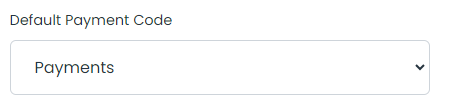
 

To adjust it, do the following:

  • Log in to pos2.omniboost.io / datahub.omniboost.io with the details you know. The Mapping page should open automatically. If not, navigate to Mapping
  • Navigate to the correct payment methods

  • Map these with the correct codes from your PMS system, make sure all fields are completed
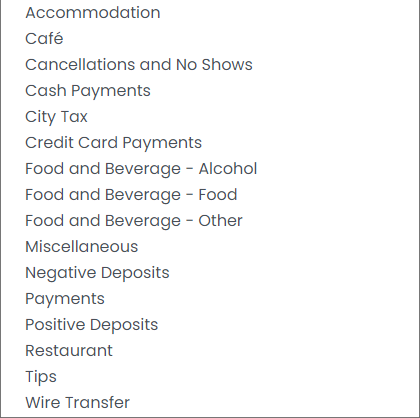
 

  • Click Save


Can't figure it out? Then it is best to call Omniboost support on: 085 130 2519

netherlands connect methods

Was this article helpful?

Yes
No
Give us feedback about this article

Contact Us

If you still have questions or prefer to get help directly from an agent, please submit a request.
We’ll get back to you as soon as possible.

Please fill out the contact form below and we will reply as soon as possible.

Related Articles

  • DISH Reservation Starter guide
Logo DISH
Want to learn more
about our solutions?
Book a demo
App Store
Google Play Store
  • About
  • Contact
  • Sitemap
  • Careers
  • Home
English International
© Copyright dish.co 2025
  • Imprint
  • Terms of Use
  • Privacy Policy
  • Cooperation Partner
  • Privacy Settings
Expand