Contact Us

If you still have questions or prefer to get help directly from an agent, please submit a request.
We’ll get back to you as soon as possible.

Please fill out the contact form below and we will reply as soon as possible.

  • POS
  • Pay
  • Reservation
  • Order
  • Website
  • English (UK)
    GB English (UK)
    FR French
    DE German
    ES Spanish
    IT Italian
    NL Dutch
    PL Polish
    CS Czech
    SK Slovak
    HU Hungarian
    RO Romanian
    HR Croatian
    PT Portuguese
  • Log in
  • Updates
  • POS
  • Pay
  • Reservation
  • Order
  • Website
  • English (UK)
    GB English (UK)
    FR French
    DE German
    ES Spanish
    IT Italian
    NL Dutch
    PL Polish
    CS Czech
    SK Slovak
    HU Hungarian
    RO Romanian
    HR Croatian
    PT Portuguese
  • Log in
  • Home
  • Pay
  • DISH Pay Now
  • Comprehensive Guide

DISH Pay Now - How can I fix login issues I might encounter with the DISH Pay app?

Welcome to the DISH Pay app! In this article, we are going to provide some information and solutions on common issues you might encounter while using the DISH Pay app! When attempting to log in, you…

Table of Contents

Welcome to the DISH Pay app! In this article, we are going to provide some information and solutions on common issues you might encounter while using the DISH Pay app! When attempting to log in, you may encounter various errors. Below you'll find a compilation of common issues and their solutions. We want your feedback

Welcome to the DISH Pay app! In this article, we are going to provide some information and solutions on common issues you might encounter while using the DISH Pay app!

When attempting to log in, you may encounter various errors. Below you'll find a compilation of common issues and their solutions.

NFC Unavailability:

NFC enables the reading of card payments. If NFC (Near Field Communication) is not accessible, you won't be able to do so.
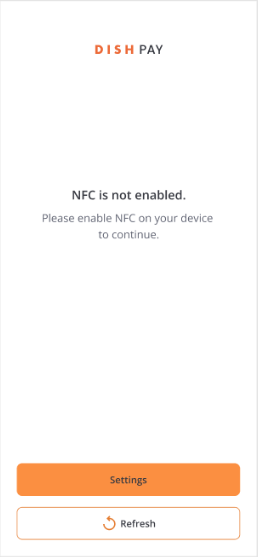
Not sure if NFC is activated on your device? You can easily check that. To do so, swipe down the screen from top to bottom to access your quick access settings. There you will find a button referring to NFC. Make sure NFC is turned on and resume to your home screen.

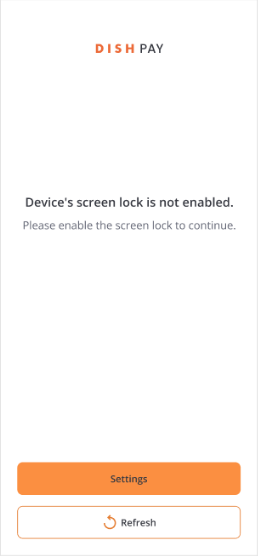
Devices screen lock is not enabled:

To prioritize privacy and security, it is essential to have the screen lock enabled through either a PIN or a pattern. Simply navigate to Settings to confirm that this feature is activated.
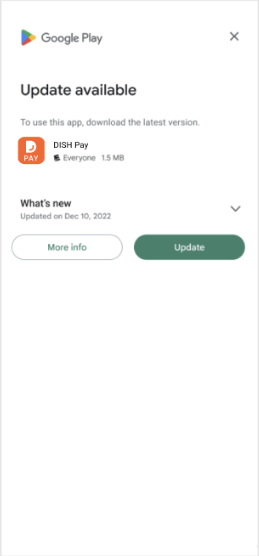
Update available:

When a new version of the application is accessible, a pop-up message will appear automatically. Simply click on "update" to guarantee that you are utilizing the most recent version and have access to the latest features.
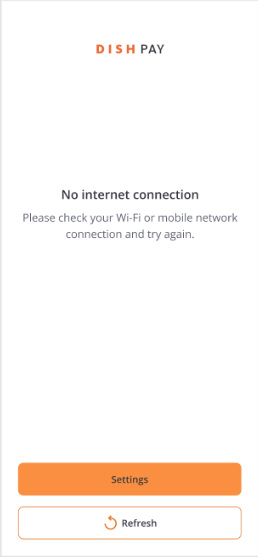
No internet connection:

To initiate the transition process, an active internet connection is essential. Make sure that you are connected to a Wi-Fi network and input the password if prompted by your network. Navigate to the Settings option to access the appropriate configuration screen.
We want your feedback

Your opinion is very important to us. Did you like this tutorial? Was it helpful? Rate it using the emojis down below.

app troubleshooting login problems

Was this article helpful?

Yes
No
Give us feedback about this article

Contact Us

If you still have questions or prefer to get help directly from an agent, please submit a request.
We’ll get back to you as soon as possible.

Please fill out the contact form below and we will reply as soon as possible.

Related Articles

  • DISH Pay Now Datasheet
  • DISH Pay Now - How can I activate DISH Pay Launcher?
  • DISH Pay Now - How do I log in to the DISH Pay app and do my first transaction?
  • DISH Pay Now - How do I provide a digital receipt with my DISH Pay app?
Logo DISH
Want to learn more
about our solutions?
Book a demo
App Store
Google Play Store
  • About
  • Contact
  • Sitemap
  • Careers
  • Home
English International
© Copyright dish.co 2025
  • Imprint
  • Terms of Use
  • Privacy Policy
  • Cooperation Partner
  • Privacy Settings
Expand