Contact Us

If you still have questions or prefer to get help directly from an agent, please submit a request.
We’ll get back to you as soon as possible.

Please fill out the contact form below and we will reply as soon as possible.

  • POS
  • Pay
  • Reservation
  • Order
  • Website
  • English (UK)
    GB English (UK)
    FR French
    DE German
    ES Spanish
    IT Italian
    NL Dutch
    PL Polish
    CS Czech
    SK Slovak
    HU Hungarian
    RO Romanian
    HR Croatian
    PT Portuguese
  • Log in
  • Updates
  • POS
  • Pay
  • Reservation
  • Order
  • Website
  • English (UK)
    GB English (UK)
    FR French
    DE German
    ES Spanish
    IT Italian
    NL Dutch
    PL Polish
    CS Czech
    SK Slovak
    HU Hungarian
    RO Romanian
    HR Croatian
    PT Portuguese
  • Log in
  • Home
  • Pay
  • DISH Pay Now
  • Comprehensive Guide

DISH Pay Now - How do I provide a digital receipt with my DISH Pay app?

Welcome to the DISH Pay Now App! In this tutorial, we are going to show you how you can provide a digital receipt through a qr-code on your device! Step-by-step instructions. After every transaction,…

Table of Contents

Welcome to the DISH Pay Now App! In this tutorial, we are going to show you how you can provide a digital receipt through a qr-code on your device! Step-by-step instructions We want your feedback

Welcome to the DISH Pay Now App! In this tutorial, we are going to show you how you can provide a digital receipt through a qr-code on your device!

Step-by-step instructions

After every transaction, you have the possibility to send a digital receipt to the cardholder.
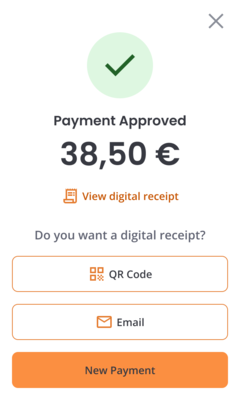
  1. Once a transaction is completed, you can provide a digital receipt.
  2. To do so, you can first press QR Code.
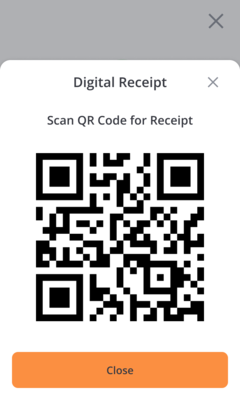
  1. A QR code will be displayed on screen.
  2. If you want to receive the receipt by email, you can click on Email.
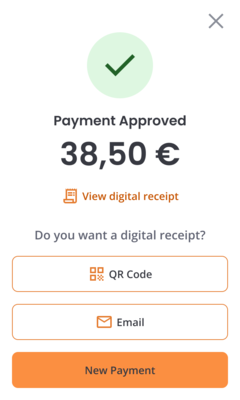
  1. A new window will open, where you can type the email you wish to send the receipt to.
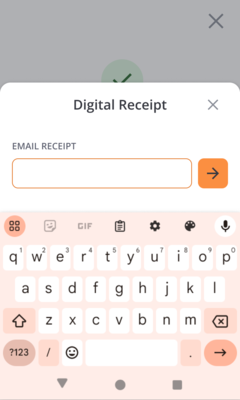
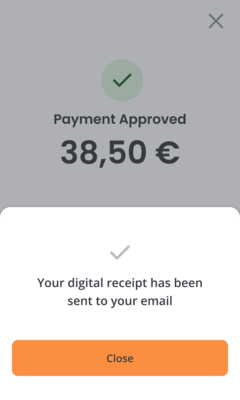
  2. After pressing on send, you will see a confirmation message.
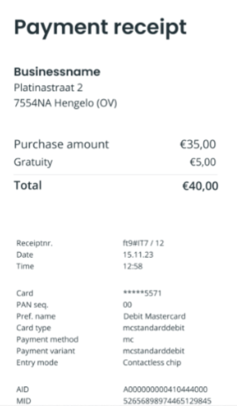
  1. This is how your digital receipt will look like.
That's it! You now know how you can provide a digital receipt through a qr-code on your device or send it by email!

We want your feedback

Your opinion is very important to us. Did you like this tutorial? Was it helpful? Rate it using the emojis down below.

app payment digital receipt

Was this article helpful?

Yes
No
Give us feedback about this article

Contact Us

If you still have questions or prefer to get help directly from an agent, please submit a request.
We’ll get back to you as soon as possible.

Please fill out the contact form below and we will reply as soon as possible.

Related Articles

  • DISH Pay Now Datasheet
  • DISH Pay Now - How can I fix login issues I might encounter with the DISH Pay app?
  • DISH Pay Now - How do I send a refund from the DISH Pay app?
  • Removing PIN Screen Lock on DISH Pay Now Device
Logo DISH
Want to learn more
about our solutions?
Book a demo
App Store
Google Play Store
  • About
  • Contact
  • Sitemap
  • Careers
  • Home
English International
© Copyright dish.co 2025
  • Imprint
  • Terms of Use
  • Privacy Policy
  • Cooperation Partner
  • Privacy Settings
Expand